Record once. Get the notes in the language spoken, and in yours.
Tap record at a meeting, a class, a parent-teacher night or church. PeaceLingo writes down who said what, summarizes the decisions and to-dos, translates them, and emails you both versions.
iPhone, Apple Watch, Android, Wear OS and web, plus a Mac app and a Chrome extension for online meetings. Coming to the App Store and Google Play.
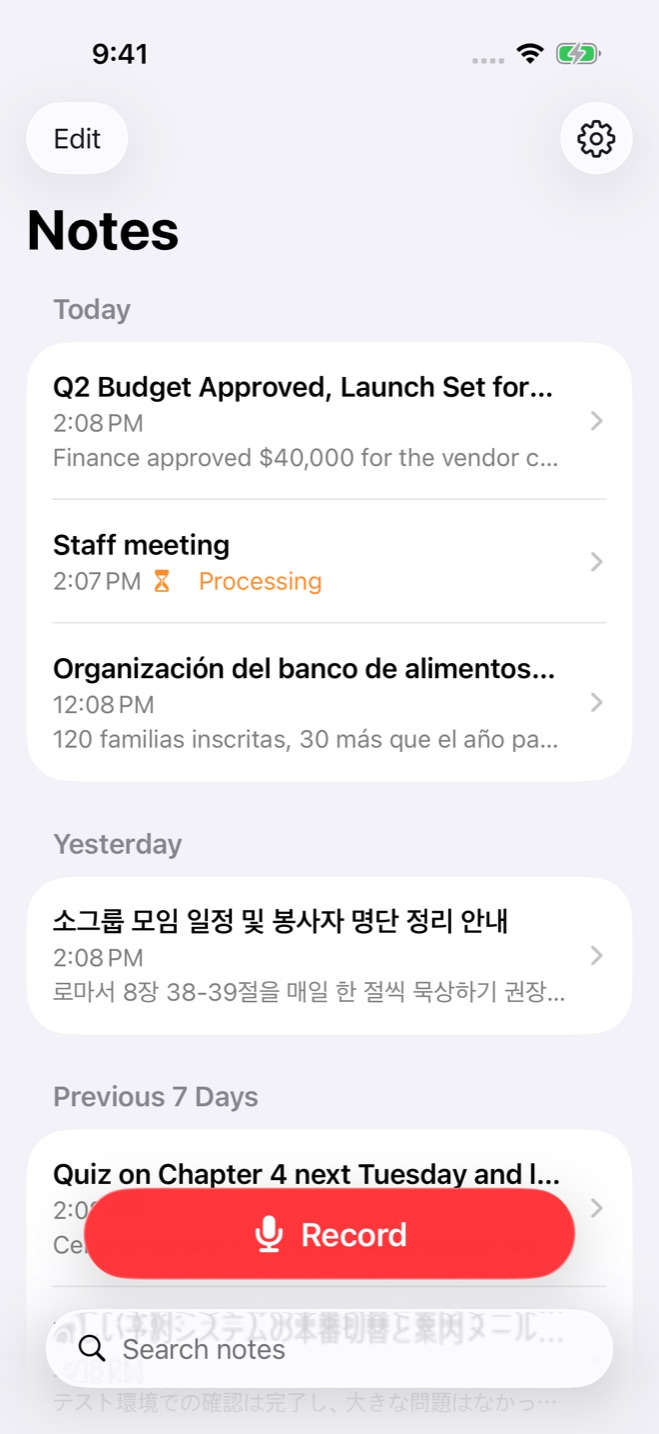
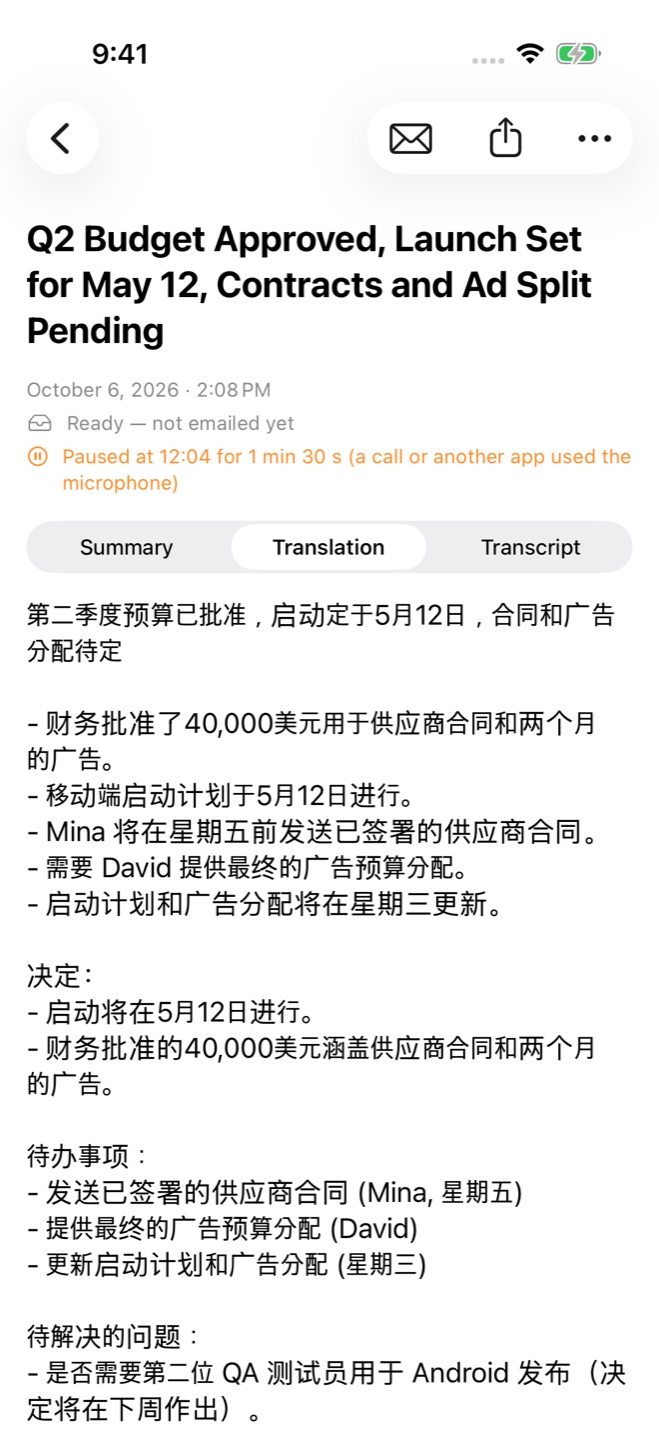
Made for every screen you own
Built with each platform's own design tools, so it feels at home: Apple's Liquid Glass and navigation on iPhone and iPad, Google's Material 3 on Android. Unfold a Galaxy Z Fold or an iPhone Duo, and the list sits beside the note.
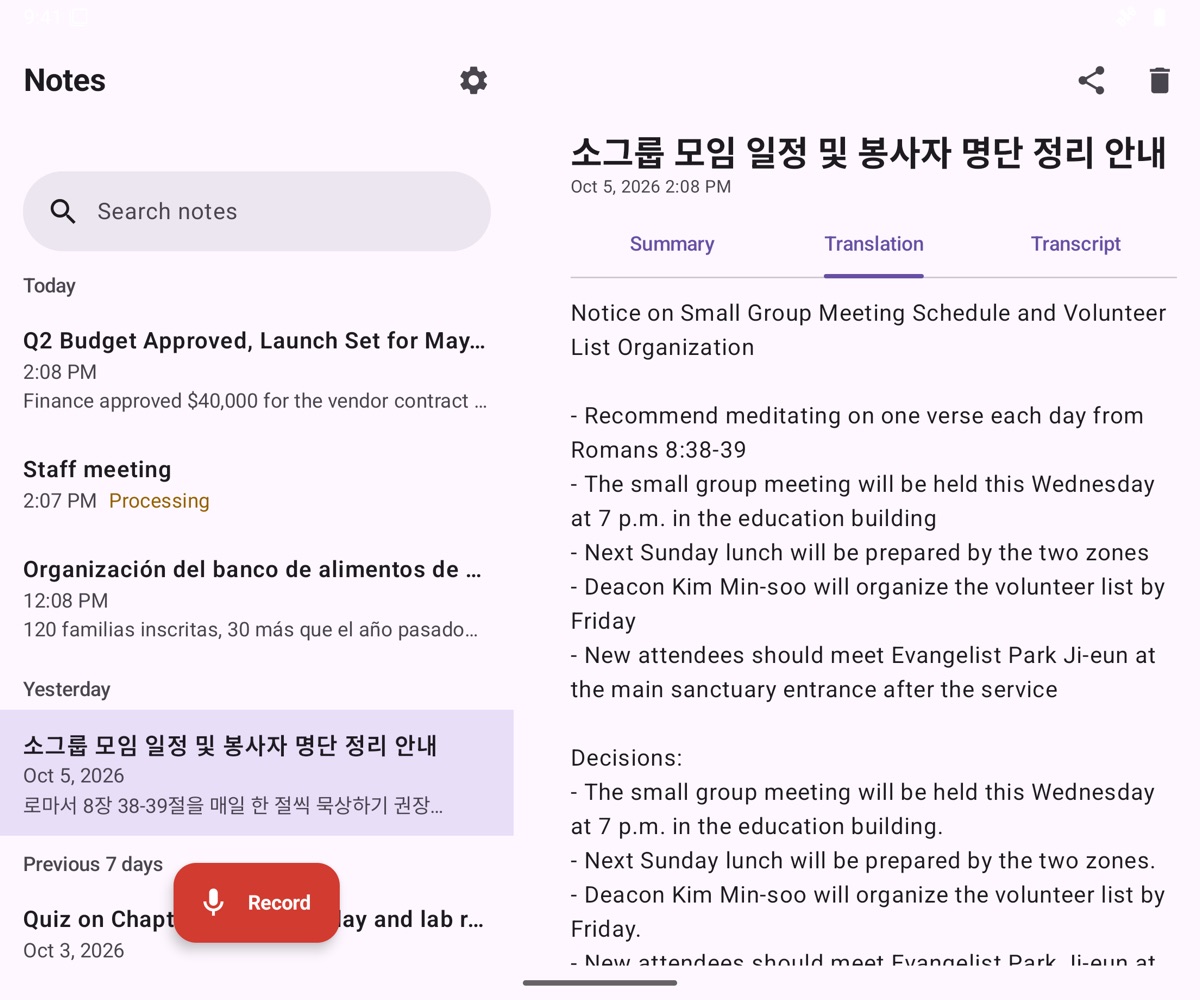
Real notes from real recordings, each into a different language: a Korean sermon → English · an English budget meeting → 中文 · an English biology class → Français · a French parent-teacher meeting → English · a Spanish food-bank meeting → 한국어 · a Japanese work meeting → English




Zoom, Teams and Meet, without a bot
For calls on your computer. Nothing joins the meeting: PeaceLingo records what your own computer plays and hears, only after you click record, and reminds you to tell everyone.

Mac menu bar app Beta
One click in the menu bar records Zoom, Teams or Meet, in the app or the browser. Your microphone uses echo cancellation, so a call on speakers isn't recorded twice. macOS 14.4 or later.
Same account, same notes
Connect with a short code you approve on the web. Notes arrive in the app and by email, like any recording, in the language spoken and in yours.
Up to 100 minutes a call
If the upload fails, the recording stays on your computer until the notes are made, so you can send it again.
Built so no recording gets lost
A two-hour sermon or a long board meeting is the recording you can't redo. So the app plans for what goes wrong in real rooms.
A call comes in
Recording pauses for the call and picks up after it. Your note marks exactly where, and for how long.
You close the app
The upload keeps going in the background and resumes after a weak signal. Your notes still arrive.
Your phone is almost full
The app checks for space before you start, and records compactly: an hour is about 14 MB.
Hundreds of notes later
Search every word of every note, or just ask a question. Notes are grouped by Today, Yesterday and month.
The screen goes dark
On a phone it keeps recording with the screen locked. In the browser, the screen stays awake while you record.
Tested on every release
Before an update ships, automated tests feed in real speech and check the finished notes, and check the screens at phone, foldable and tablet sizes.
How it works
No bot joins your call and nothing to set up. Everything happens after you tap stop.
Tap record
On your phone, your watch, your Mac or in the browser. Recording keeps going with the screen locked.
Who said what
Speech becomes text with each speaker labeled. Type the names of who is in the room and they are spelled right.
Notes in two languages
A short summary, the decisions and the to-dos with who owns them, in the language of the meeting and in the language you choose.
In your inbox
Both versions arrive by email and stay in the app, with the full transcript if you need to check a detail.
Ask your notes Beta
Months of meetings, one question. Ask in your own language and the answer comes back with the moment it was said, so you can check it.

Ask in any language
Your question is matched by meaning as well as by words, so an English question finds the meeting held in Spanish or Korean. The answer comes in the language your notes are in.
Every answer shows its source
Each fact ends with a numbered citation. Tap it and the transcript opens at that moment, with who said it.
Honest when it doesn't know
If your notes don't hold the answer, it says so instead of guessing. Pro includes 100 questions a month, with the count shown as you go; after that, it still finds the matching moments for you.
Made for life in two languages
Pick what you record most. PeaceLingo tunes its vocabulary to it, so names and terms come out right.
Church & community
Sermons, small groups and committee meetings, with Bible names and church terms recognized.
수요예배 · 구역모임 · 당회Work meetings
Decisions and action items with owners, for teams that switch between English and another language.
Classes & lectures
Keep every lecture summarized, with key terms in both languages to study from.
School & family
Parent-teacher meetings and school events, in a language the whole family can read.
Your words stay yours
Some note-taking apps join meetings on their own and train AI on what they hear. PeaceLingo is built the other way around.
Read the privacy policy →- Records only when you tap recordIt never joins online meetings by itself, and it reminds you to tell people you are recording.
- Audio is deleted after processingOn our servers and at our speech provider, as soon as your notes are written. You choose whether your phone keeps a copy.
- Encrypted with a key of your ownYour notes are encrypted on our server with a data key unique to your account, and so are backups. The search index behind Search and Ask lives on that same server. No one on our team reads your notes; support access needs your permission and is logged.
- Your notes, until you delete themTranscripts and notes stay in your account so you can open them anywhere. Delete a note and it is gone from our server right away.
- Never used to train AINot ours and not our providers'. No ads, no ad trackers or cookies, no selling data. We only count visits, anonymously.
Under the hood
Speech recognition tuned per use case, with an extra correction pass for Korean and Chinese, then one model for the summary and the translation.
Swipe the diagram sideways to see every step.
Speaker-aware
Each line of the transcript is labeled by speaker, so to-dos get the right owner, and names nobody said aloud are never made up.
Tuned for Korean and Chinese
Church, work, class and school vocabularies, plus a dictionary pass that fixes near-miss words by how they sound.
Measured, not guessed
Every change is scored on test recordings in six languages for facts kept and owners named, before it ships.
Simple pricing
One plan, PeaceLingo Pro, with every feature, monthly or yearly. Start with a 7-day free trial on the yearly plan.
Pro · Yearly
$59.99 / year
About $5 a month · save 37%
- 20 hours of recording a month
- Recordings up to 100 minutes
- Notes in the spoken language + yours
- Ask your notes: 100 questions a month Beta
- Every app: phone, watch, web, Mac and Chrome
Pro · Monthly
$7.99 / month
Cancel anytime
- 20 hours of recording a month
- Recordings up to 100 minutes
- Notes in the spoken language + yours
- Ask your notes: 100 questions a month Beta
- Every app: phone, watch, web, Mac and Chrome
Prices in US dollars; your app store shows the price in your currency. The free trial includes 2 hours of recording and 20 questions. Cancel in your App Store or Google Play settings before the trial ends and you are not charged.
Coming next: live interpretation
Live subtitles in English and Chinese for Korean sermons and lectures, on every phone in the room.
Questions
Write to hello@peacelingo.com if yours isn't here.
Which languages does it support?
Notes are written in the language people speak and translated into the one you choose, from any of these to any other: English, Korean, Chinese, Japanese, Spanish, Vietnamese, French, German, Portuguese and Tagalog. A Korean sermon into Chinese, a Spanish meeting into Korean, an English class into Vietnamese.
What if people switch languages mid-meeting?
The transcript keeps every word as spoken. The notes are written in one language, the one used for most of the meeting, and translated into yours.
Do I need permission to record?
Recording laws differ by place, and some require everyone's consent. PeaceLingo reminds you to tell people before you record; you are responsible for following the law where you are.
Where is my audio stored?
On your phone, if you choose to keep it. Our servers delete it as soon as the notes are written, and so does our speech-recognition provider. Transcripts and notes stay in your account until you delete them, and a deleted note leaves our server right away.
Does it join Zoom or Teams calls?
No bot ever joins. For online meetings, the Mac menu bar app records Zoom, Teams and Meet from your Mac's own audio, and the Chrome extension records a meeting in a browser tab, on Windows and Chromebook too. Both are in beta and record only after you click record. Tell everyone you're recording.
How accurate is it?
Very good on clear audio, but AI can still get names, numbers or dates wrong. Every note comes with the full transcript so you can check anything important.
Can I ask questions about my notes?
Yes, in beta on the web first. Ask about one meeting or all of them, in any of the 10 languages; the answer cites the moments in the transcript it came from, and says so when your notes don't hold the answer. Pro includes 100 questions a month (20 in the free trial), counted where you can see it; past that, you still get the matching moments without the written answer. To build the index, short passages of your notes are sent to OpenAI, which doesn't use them for training; see the privacy policy.
Is there a free plan?
No free plan, which is how we can pay for good speech recognition without ads or selling data. The yearly plan starts with a 7-day free trial.